I've been using Syncthing for years to keep files in sync between my laptop, desktop, phone, tablet and home server. It is an amazing piece of software and has been very reliable, with only the occasional conflict, but I have never lost any data. On the contrary, Syncthing file versioning has saved me more than once.
Syncthing has its own discovery and NAT traversal solutions, so devices that are behind firewalls can see each other and still connect. However that depends on external servers to handle the connections, and they could keep metadata. Even if they don't, they might degrade performance.
Now that I have a tailnet interconnecting all my devices, there's no reason to deal with any of that. Every peer already has a stable address reachable from every other peer. Syncthing can just use it, it only needs some configuration.
This post is about reconfiguring Syncthing to rely on the tailnet exclusively, turning off all the WAN-oriented machinery it no longer needs.
Goals
- Syncthing peers talk to each other only over the tailnet.
- No reliance on Syncthing's public global discovery servers.
- No reliance on Syncthing's relay network.
- No need for NAT traversal, it's handled by tailscale.
- No open ports in the router, no need for UPnP.
- Everything Just Works™ when I'm on the go.
Why do this
A few small wins that add up:
- Privacy. Syncthing's global discovery phones home to announce
(device ID → public IP). With the tailnet, that broadcast is pointless and can be disabled. - Reliability. Relays are slow and occasionally flaky. Direct tailnet connections are fast and consistent, and Tailscale's DERP already provides relay fallback at the network layer if a direct path can't be established.
- Simplicity. Each peer's address becomes a fixed tailnet IP (or MagicDNS name). No more wondering why two devices aren't finding each other.
- Security. Syncthing listens on TCP/UDP 22000 and UDP 21027 by default. If those ports are exposed on the WAN, they're an exposed service to the Internet. Turning everything off except the tailnet path closes that door, reducing the attack surface.
Reconfiguring Syncthing
Syncthing ships with a bunch of features to make it work across the internet with no configuration:
| Setting | Default | Purpose | On tailnet |
|---|---|---|---|
| Sync Protocol Listen Addresses | default |
Where to accept incoming syncs | Device's tailnet IP |
| Enable NAT traversal | On | UPnP / NAT-PMP to open ports in router | Off |
| Global Discovery | On | Announce device ID → IP on public discovery servers | Off |
| Local Discovery | On | LAN multicast to find peers | Off |
| Enable Relaying | On | Fallback traffic via public relay servers | Off |
Global and local discovery, NAT traversal, and relaying are all redundant once every peer has a stable tailnet address.
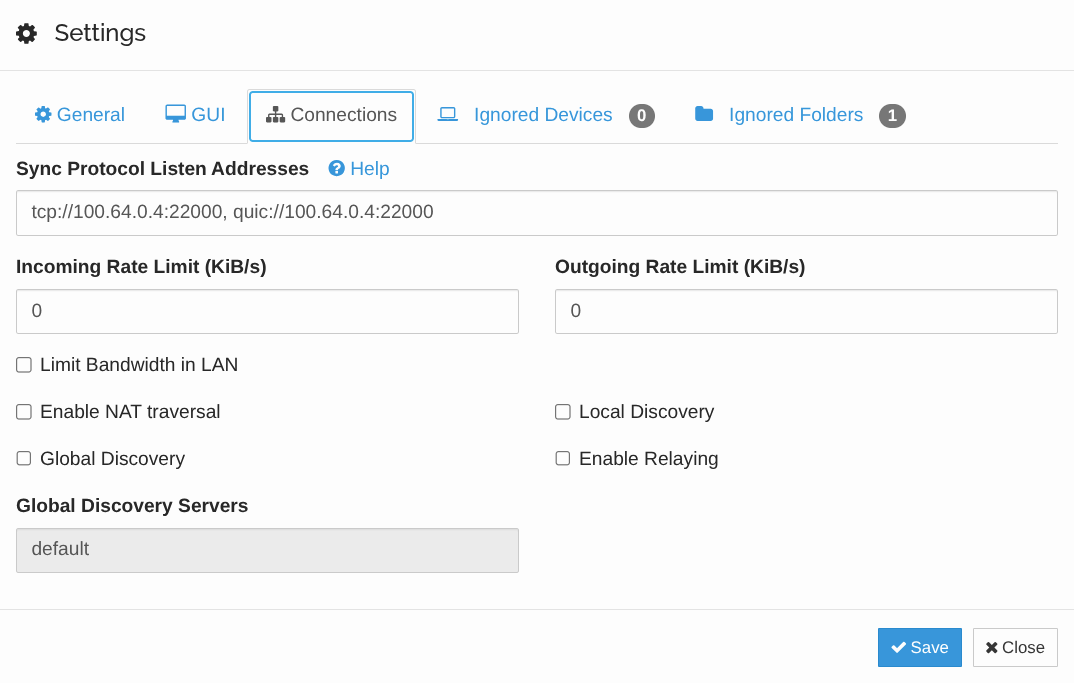
I changed the settings on every computer via the Syncthing web UI (Actions → Settings → Connections):
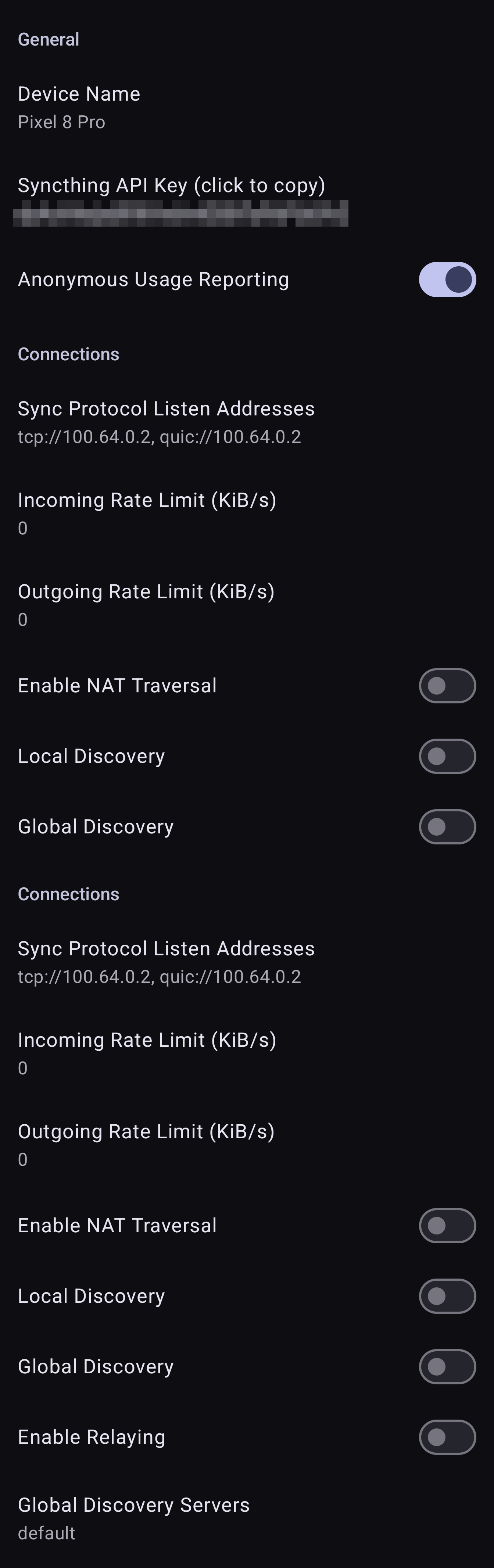
And in Android devices in the settings of the Syncthing app (inside Syncthing Options):
You might need to restart Syncthing after saving.
About Listen Addresses
Sadly Syncthing doesn't support binding to a specific interface, i.e. this won't work:
tcp://%tailscale0:22000, quic://%tailscale0:22000
Binding to the tailnet IP directly does work:
tcp://100.64.0.1:22000, quic://100.64.0.1:22000
The listener is then tied to a specific IP that could potentially change if the device ever re-registers, but that will be unlikely enough for me that it's a reasonable compromise.
An arguably less secure alternative is to leave the listen as default, which will bind to all interfaces, and then rely on the device firewall to block connections not through the tailnet.
Configure peers by tailnet address
With global discovery off, peers can no longer find each other automatically. The solution is to update each device's configuration to point explicitly at the peer's tailnet address:
Device → Edit → Addresses:
tcp://homeserver.ts.fidelramos.net:22000
MagicDNS hostnames work fine here because Syncthing resolves the address on every connection attempt, not just at startup (unlike listen addresses).
If MagicDNS is flaky on a particular client, you can use the raw tailnet IP (tcp://100.64.0.1:22000).
I do this for every pair of devices in both directions.
Firewall
Since Syncthing should only be reachable over the tailnet, I remove existing rules that allowed Syncthing connections on my public network.
In my case I use firewalld, I removed rules from the public and home zones and let trusted (which is associated to the tailscale0 interface) accept everything automatically:
# Clean up any previously-allowed Syncthing ports
$ sudo firewall-cmd --permanent --zone=public --remove-port=22000/tcp
$ sudo firewall-cmd --permanent --zone=public --remove-port=22000/udp
$ sudo firewall-cmd --permanent --zone=public --remove-port=21027/udp
$ sudo firewall-cmd --permanent --zone=home --remove-port=22000/tcp
$ sudo firewall-cmd --permanent --zone=home --remove-port=22000/udp
$ sudo firewall-cmd --permanent --zone=home --remove-port=21027/udp
$ sudo firewall-cmd --reload
Check:
sudo firewall-cmd --zone=public --list-all
sudo firewall-cmd --zone=home --list-all
Neither zone should list port 22000 anywhere.
trusted zone doesn't need anything listed because it's permissive by default.
For Docker-based Syncthing deployments, it's worth mentioning that a configuration like ports: ["22000:22000"] bypasses firewalld.
Either bind to the tailnet IP (ports: ["100.64.0.1:22000:22000/tcp"]) or use host networking.
Native installs are simpler here.
Router
I used to have port TCP/UDP 22000 forwarded to my home server, and other ports for other devices in my home network. Not anymore:
- Remove port 22000 (TCP and UDP) from the router's port-forwarding rules.
- Remove any inbound allow rules for it.
Fewer exposed port on the WAN is always a good thing.
Verifying
The Syncthing web UI is my first check. On each device:
- The peer shows as Connected.
- The connection detail shows something like
tcp://100.64.0.2:22000, i.e. a tailnet address, not a public one. - No "relay" indicator.
From the command line on the home server:
$ ss -tulpn | grep -E '22000|21027'
udp   UNCONN 0      0               100.64.0.4:22000      0.0.0.0:*    users:(("syncthing",pid=1526,fd=113))
tcp   LISTEN 0      4096            100.64.0.4:22000      0.0.0.0:*    users:(("syncthing",pid=1526,fd=110))
Syncthing is still listening on 22000, but on the tailnet IP.
That's fine, firewalld ensures only the tailnet can reach it.
# Connection to public IP fails
$ nc -zv 83.241.182.82 22000
nc: connect to 83.241.182.82 port 22000 (tcp) failed: Connection refused

# Connection to LAN IP fails
$ nc -zv 192.168.1.10 22000
nc: connect to 83.241.182.82 port 22000 (tcp) failed: Connection refused

# Connection to tailnet IP works
$ nc -zv 100.64.0.1 22000
Connection to 100.64.0.1 22000 port [tcp/snapenetio] succeeded!
With Tailscale back on, the same check via tailnet address should succeed.
Encountered pitfalls
Listen address %tailscale0 syntax
As mentioned above, don't try to bind Syncthing to an interface name.
Use the device's tailnet IP, or leave as default (but configure firewall properly).
Peers can't find each other after disabling discovery
Obvious in hindsight, but it caught me once: if a peer's address is still set to dynamic with all discovery off, it has no way to find anyone. Set explicit addresses for every peer.
MagicDNS fails at startup on a laggy client
If Syncthing tries to reach e.g. homeserver.ts.fidelramos.net before Tailscale is up on a device (e.g. on a phone that was rebooted), the connection fails with a DNS error. It retries a few seconds later and succeeds.
There is nothing to fix, it's just noise in the logs.
Using IP addresses instead of MagicDNS names avoids the retry but loses the readability and resilience if a device ever reregisters on Headscale.
Syncthing on a containerized deployment
If you run Syncthing in Docker, the ports: section in your compose file needs to not expose 22000 to the WAN. My recommendation: run it on the host instead, or use network_mode: host, or bind explicitly to the tailnet IP. Docker's port publishing defaults to 0.0.0.0 and bypasses firewalld.
Discovery announcement caching
After I turned off global discovery, other Syncthing users who had previously discovered my device via the public discovery server would still have the stale public IP cached for a while. This isn't a leak, it's just that they'd try connecting to the old IP and fail. Purely cosmetic, and it goes away on its own within a day or so. Nothing to do unless you're sharing folders with people outside your tailnet (and in that case, you shouldn't have disabled global discovery in the first place).
What's next
Syncthing now runs entirely inside the tailnet, with no WAN exposure and no reliance on Syncthing's public infrastructure. I have noticed that devices connect faster, but I haven't run any benchmarks on transfer speeds.
In Part 4 I'll do the same thing for my web services: I will move most of my apps from a public app.fidelramos.net domain to a tailnet-only app.ts.fidelramos.net, using a split caddy-docker-proxy solution and TLS will still Just Work™.
