The Problem
I’ve been using Venice.ai (referral link if you want to sign up) for quite some time now for all my artificial intelligence needs. I love it because, unlike most AI platforms, it’s private:
- When you use Venice’s own models (open-source models running on their own servers), they don’t keep a log of the prompts, meaning your usage is private. Most providers keep logs of everything, and even worse are those that identify you personally (say, through your Google account) so they can link all your conversations to create profiles with a very dangerous level of detail.
- When using external models (GPT, Claude, Gemini, etc.), Venice acts as an anonymizing proxy, meaning the final model doesn’t know who’s making the request. Obviously, they receive the full prompt and will log it, but as long as you don’t include personal information in it, they shouldn’t be able to identify you.
Another thing I like is that they have a token system through which I enjoy a Pro account (with 100 VVV), and I also have credits to spend every day (1 DIEM gives you $1 in credits every day, forever).
The problem was that sometimes I’d be coding in Opencode and suddenly see a message saying I’d run out of credits. I wanted a widget on my desktop (KDE) so I could see at a glance how much I had left to spend for the day. In the past, this would have been a project buried in the dustbin of history, but after discovering whatcable-linux, I realized that creating these widgets was well within my reach.

Implementation
I started a new project with Deepseek V4 Pro on Opencode. As I mentioned in the previous article it had just been released and promised results similar to Claude Opus at a fraction of the price, so I wanted to test drive it on real projects.
The first step was to generate an AGENTS.md file with the project’s objective and structure. Then I asked it to document the Venice API we were going to use. So far, so good.
The next step was to generate a static widget that would display the information I needed, but without interacting with any APIs for the time being. This is where Deepseek failed miserably: the QML files (the language specific to the Qt library used by KDE) it generated wouldn’t even compile; the widget wouldn’t load at all. After several attempts, I had to give up and switch to Claude Opus 4.7.
Opus discovered that the problem was that the widget was being cached by KDE, so even if I installed a new version, the old one kept loading. Deepseek had probably fixed the problem, but I was still seeing the old cached version.
Opus found a way to restart Plasma so that it would load the new version of the widget, and with that, it compiled and displayed correctly. From there, the process became much more iterative.
Next step: connect to the actual API. To simplify things, I asked it to read the token from an environment variable, and Opus got it right on the first try. I could already see my real data! As a personal project, I could have stopped there, it was already useful and did what I needed, but I wanted to polish and publish it in case others wanted to use it, so I iterated a bit more.
The next step was to store the token securely, making sure it wasn't stored in plain text anywhere. I asked Opus to explore some options:
I decided to go with secret-tool because, although KWallet is KDE’s native system, it has long been integrated with libsecret (and therefore with secret-tool). Opus once-shotted it (minus a startup bug).
The rest involved iterating on the user interface (gotta love those transparent widgets), tweaking colors and positions a bit, and adding some configuration options; nothing major worth mentioning.
Result
After spending the weekend tinkering, the result was venice-kde-widget.
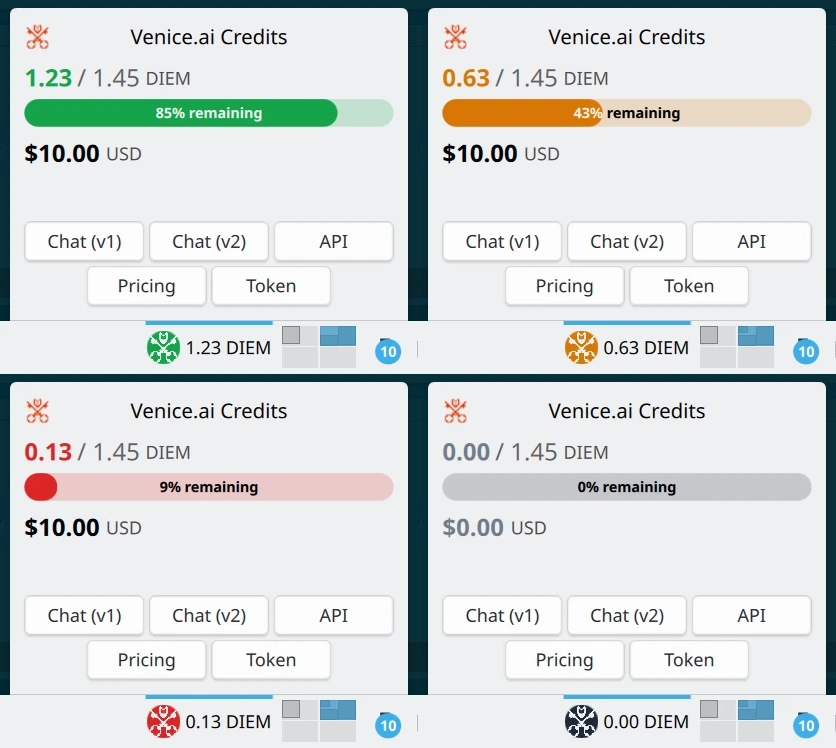
I use it every day, and it’s been working like a charm. :)
Lessons
The initial problem (that the widget was cached by KDE Plasma) made me realize that many models require more specific instructions than others; they’re less creative. If I had asked them to consider alternative reasons for why it kept failing, they might have figured it out, but I myself didn’t think of the possibility that it was cached. Opus was the only one proactive enough to think, “Let’s confirm whether the code that’s actually running is the one we have in the repository.” It was smarter than me, all things considered.
That proactivity is something Simon Willison wrote about in relation to Fable 5. This experience suggests that this applies to other models as well. In other words, Claude Opus 4.7 was more proactive than Deepseek V4 Pro. I’m curious to know if proactivity can be measured across models, and if there are any studies on the subject.
Another lesson is that for a project using such a niche technology (KDE widgets in QML), most models won’t yield great results, they likely lack training. Perhaps the results would have been better if I had told them to look at the code of other widgets to use as a reference. Opus ended up doing just that for some problems he couldn’t solve: he looked at the other widgets installed on the system to analyze their code. It probably would have been a good idea to search for similar widgets and request an analysis before implementing. Or even better fine-tune a coding model on KDE widgets, but that would be way out of scope.
The results from this project, along with those from pelican-copy-code in the previous article, have led me to significantly reduce my use of Deepseek V4 Pro; it’s cheaper, but it’s not worth it if it leads me down dead ends with code that doesn’t work and needs to be fixed.
I continued using Kimi 2.6 as my default model, mainly because it’s private on Venice.ai. That changed with GLM 5.2, but that’s another story.
