Those who have been paying attention to the blog know that I bought a house and have been planning its full renovation. As a computer nerd what excites me the most is the opportunity to implement my dream smart home, networking and home server.
I have a clear idea of what I want to achieve: an open‑source homelab that replaces closed cloud ecosystems with local‑first services. Smart home automation, security cameras and video doorbell, contacts and calendars, media players, photo collection, documents, and more, all running on premises and fully under my control. Do note that I already have a homelab, where some of these services have been running for years already. This new project will replace it completely, it will be bigger and better! Do read that article if you have the chance as it gives a rationale of what moved me to start self-hosting services and the historical context of how I got here.
In this series of posts I will go into all the technical details, starting with the design I arrived at after months of research.
The setup is completely personal and opinionated, tailored to my particular needs and taste, so don't take it as a recommendation. I do hope that it's a fun read and you learn something cool!
My goals are:
- Local‑first: Smart home, cameras, media, and personal data should work without any cloud dependency. Internet access could go down and everything would keep working locally. Also I can trust my data won't leave my home.
- Strong isolation: IoT and cameras are treated as hostile. They get no Internet egress and limited access to internal services. Cloud connectivity is to be avoided whenever possible.
- Standards‑based and open-source: ONVIF, RTSP, IPv6, WireGuard, ZFS, Proxmox, TrueNAS, IPFire, Home Assistant, Frigate, Nextcloud, Jellyfin, Immich... avoid proprietary black boxes.
- Cost: While the whole setup won't be cheap by any means, I will look for refurbished server‑grade hardware and favor low-power devices. The system will have a lot of responsibilities so I need quality reliable hardware.
- Future‑proof: 10 GbE-ready via Cat6a, core‑rich servers, room for expansion, IPv6 everywhere.
Other articles in the series:
- Part 1: Design and Planning
- Coming soon, stay tuned for updates!
1. Overview
The homelab will consist of multiple components mounted on a 19-inch 42U rack in a dedicated room in the basement of the house.
- Core networking and security
- I want to be in control of the home network: prevent Internet access for smart home and cameras and limit access to internal services.
- A dedicated server running IPFire will provide routing, firewalling, IDS and VPN.
- UniFi switch and WiFi access points (APs).
- VLANs for strict segmentation (LAN, IoT, cameras, guests, management).
- Application server
- I will migrate the self-hosted services running in my current home server, and expand them.
- Proxmox VE on a server‑grade box (Dell PowerEdge class).
- Mix of VMs and LXC containers for services.
- Storage
- I have considerable storage needs as I keep a large photo collection and a local media library.
- TrueNAS running as a VM on Proxmox, backed by a dedicated disk pool.
- ZFS for redundancy, snapshots, and replication.
- Cameras and doorbell
- Dahua cameras and doorbell with ONVIF/RTSP/IPv6 and 2‑way audio.
- Dedicated PoE switch.
- Frigate for NVR‑like recording and object detection.
- Coral TPU for efficient inference.
- Power resilience
- Solar panels and batteries will keep at least core infrastructure running.
- An UPS will provide critical backup to keep the network and cameras running and to allow graceful shutdown of the app server.
For those who enjoy a little diagram:
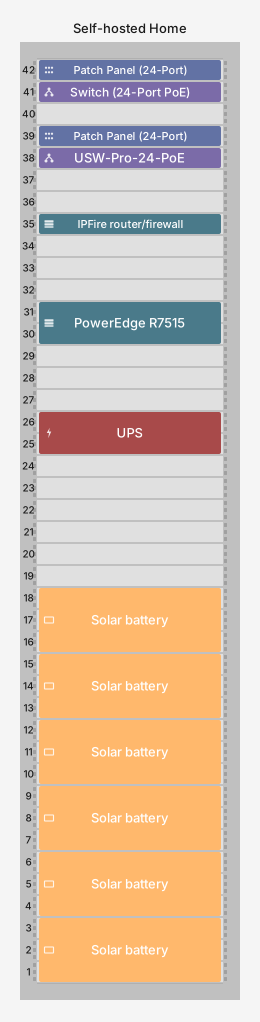
Self‑hosted services
Planned services include:
- TrueNAS, detailed below in the Storage section.
- Home Assistant for smart home automation and integration of all platforms and data.
- Frigate NVR for cameras, object detection and doorbell communication (also integrated into Home Assistant).
- Nextcloud as a personal cloud (contacts, calendar, files, notes, etc.).
- Immich as photo library.
- Jellyfin for media playback.
- Music Assistant for music playback.
- Paperless-ngx to manage documents.
- AdGuard Home for ad blocking house-wide.
- Auxiliary services: monitoring, uptime checks, logging, backup orchestration, NTP...
I mean to give access to most of these services to my family. That would amortize the setup and running costs, while bringing more privacy into their lives.
2. Networking
Networking is the foundation for everything else, it is key to the performance, security and comfort of the system.
I'm taking the opportunity that a full-house renovation brings to install Cat6a Ethernet cables throughout the house. Every room will get at least one RJ-45 port in a wall socket, and some of them multiple ones, depending on expected usage. Cat6a cables guarantee future upgrades to 10 GbE by replacing the switch, NICs and APs, the wiring would already be in place. Initially the connections will be at 2.5 GbE, with the exception of two 10 GbE for the two desktop computers.
All cables will run through the walls to the server room, to rack-mounted patch panels.
For router and firewall I will install IPFire in a dedicated server, it will be the core of the setup. A UniFi switch and multiple UniFi WiFi access points will aggregate the traffic. There will be a secondary switch for the security cameras, it will be discussed in the Cameras and Doorbell section.
IPFire router/firewall
IPFire is an open-source router and firewalling software based on GNU/Linux. I will put it on a small, low‑power but robust rack server with these (ideal) requirements:
- At least 2 SFP+ NICs (one for WAN, another for LAN, optionally another NIC for dedicated MGMT or DMZ).
- Enough CPU to handle up to 10 Gbps WAN speed.
- Dual SSD or NVMe drives to set them up in mirror for redundancy.
- Dual PSUs for power redundancy.
- As low power as possible, especially on idle.
I'm still researching options for this server. IPFire offers its own appliances, but they seem to cost too much for what they offer, so I'm looking at rack servers.
The best fit I have found so far is the Supermicro X10SDV-7TP8F, which is a system-on-chip motherboard with an Intel Xeon D-1587 CPU. It checks most requirements: enough compute power for 10 Gbps WAN; low power consumption (10W idle, 45W TDP); embedded 2x 10 GbE SFP+ NIC. It's missing dual PSUs and dual drives, but nothing is perfect.
The IPFire box will connect directly to the ISP router (in bridge mode) or a dedicated ONT.
It will handle these responsibilities:
- Terminate the WAN connection (PPPoE or DHCP, depending on ISP).
- Provide stateful firewalling for both IPv4 and IPv6.
- Perform DHCP and DNS for internal networks.
- Handle WireGuard VPN tunnels for remote access to the home network.
- IDS (Intrusion Detection System).
I want IPv6 to be a first‑class citizen: IPFire will obtain a delegated prefix from the ISP and split it across the internal VLANs. This, coupled with a deny-by-default policy, will make it easier to open services to the outside in a controlled and safe manner without the hassles and performance impact of IPv4 NAT.
UniFi switching and WiFi
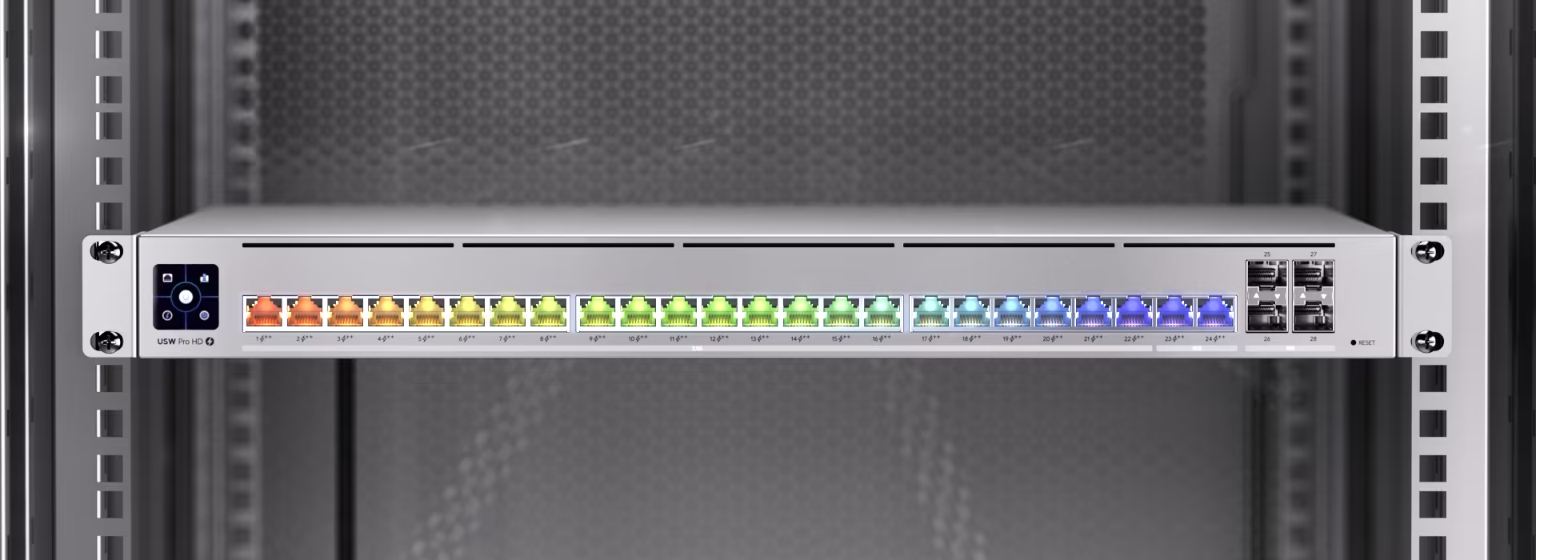
Downstream of IPFire there will be a UniFi Pro HD 24 PoE switch which will:
- Aggregate all wired segments (rooms, rack, camera uplink, WiFi APs).
- Provide PoE for the APs and potentially other devices.
- Implement VLAN tagging and firewall‑like segmentation at Layer 2/3 in cooperation with IPFire.
I searched far and wide for rack-mounted switches, but nothing came close spec-wise to this UniFi. It's got 4x 10 GbE SFP+ ports for connecting the IPFire and application servers, 2x GbE RJ-45 ports for my desktop computers, and 22x 2.5 GbE RJ-45 ports with PoE. Most other 24-port switches I found have only 1G ports, and no 10 GbE. Having 2.5 GbE from the get go will give great performance network-wide for a long time.
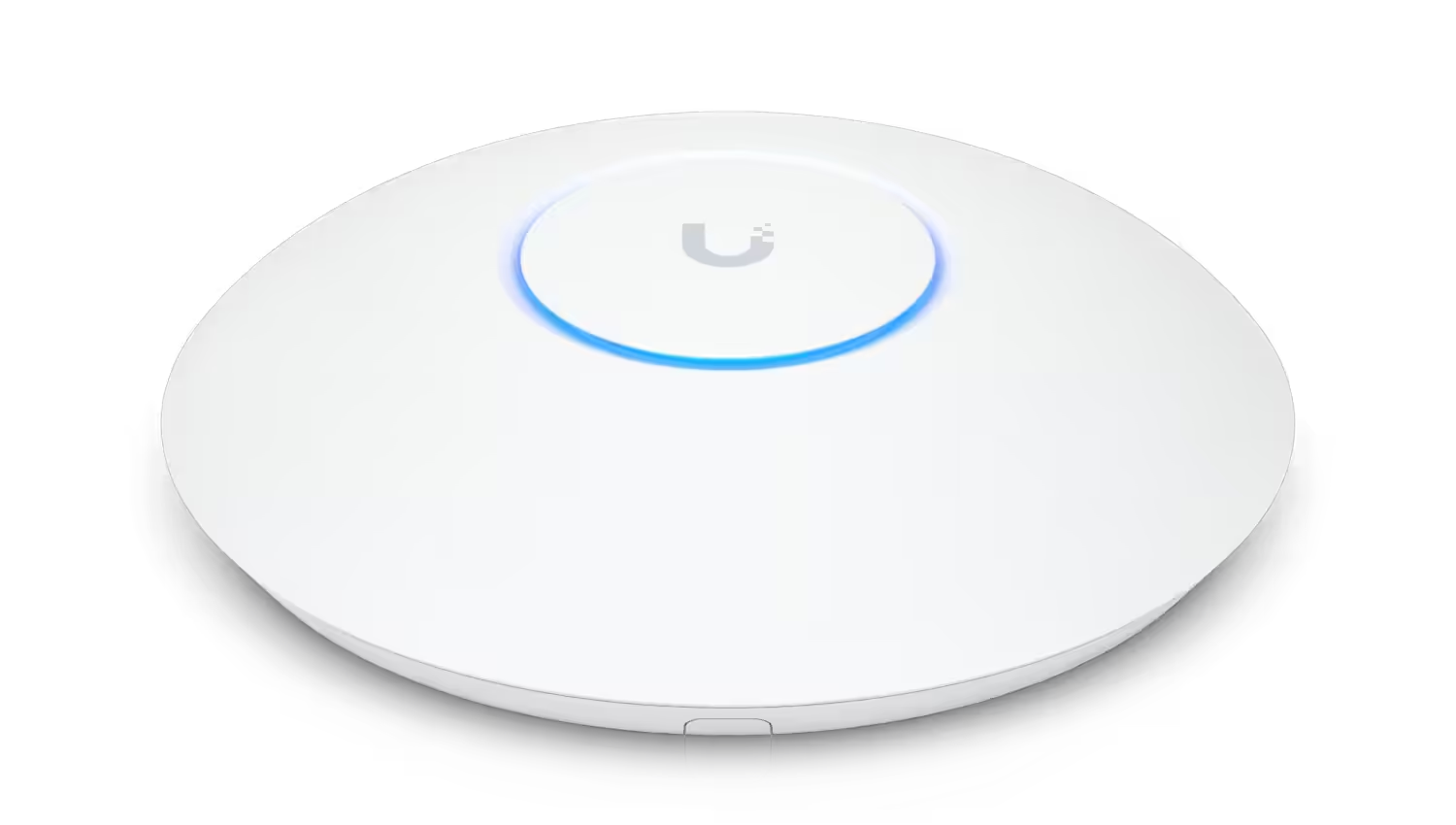
For WiFi APs I considered Grandstream APs, which are reportedly of good quality, but I discarded them because they don't support the 6 GHz band, which is the novelty of the WiFi 7 standard. I eventually settled on UniFi WiFi APs (most likely the U7 Pro), because they work with a single Ethernet cable (2.5 GbE for the U7 Pro, but in the future I could upgrade to an AP with 10 GbE), and they can be managed together with the UniFi switch.
The APs will allow for seamless roaming around the house, and will have multiple SSIDs:
- Main SSID: For trusted devices (family laptops, phones, tablets).
- IoT SSID: For wireless smart devices, mapped to the IoT VLAN.
- Guest SSID: Isolated from internal services, Internet‑only.
Proxmox will run a UniFi Network Server in a VM, that will allow for configuration of the switch and APs without cloud connectivity. I'm really trusting Ubiquiti not to screw me up with future changes that require cloud connectivity, I would be very mad if they do. This risk is why I didn't go with UniFi cameras for example. Worse comes to worst I would only need to replace the switch and APs, it's a measured risk.
VLAN design and trust model
The network will be divided into trust zones:
- Internal (Trusted): Family computers, smartphones and tablets.
- IoT: Smart home devices (sockets, switches, appliances, TV, air conditioners...).
- Cameras: Security cameras and the doorbell.
- Guest: For visitors; Internet only, no access to LAN/IoT/Cameras.
- Management: Personal computer, Proxmox, switches, router, APs, out‑of‑band management (IPMI, iDRAC).
High‑level routing/firewall rules:
- Internal: Can access services: Home Assistant, Frigate, NAS shares, etc..
- IoT: Connection to Home Assistant; no direct Internet access, except for a handful of whitelisted endpoints if absolutely required; no access to personal data.
- Cameras: Connection to Frigate; no Internet access at all, don't want my camera data exfiltrated; no access to personal data.
- Guests: Internet access only; no access to any internal services.
- Management: Only reachable from a small set of trusted admin devices.
Firewall and routing rules will be enforced jointly by IPFire and the UniFi switch, ensuring that camera and IoT traffic never reaches the Internet, and guests never reach anything internal.
WireGuard VPN
For secure external access I will set up Wireguard on IPFire:
- Each device (laptop, phone, tablet) gets its own public/private key pair and virtual IP.
- WireGuard peers land in a remote access subnet that has controlled access to LAN and management.
- This will avoid opening internal services to the Internet, instead providing a single, auditable path: WireGuard → IPFire → internal services.
- WireGuard is limited in features, but because of that its attack surface is much smaller than other VPNs.
This should allow full remote control of Home Assistant, camera dashboards, and administration tasks without exposing those services directly to the Internet.
3. Application Server
The core of the homelab will run on Proxmox VE, installed on a single, server‑grade box with proper remote management and redundancy.
Proxmox is a secure and robust Linux-based OS that simplifies running virtualized or containerized services. This provides a number of benefits:
- Open-source: It may seem obvious, but it avoids vendor lock-in.
- Mix VMs and containers: Both can be managed through the same interface.
- Security through isolation: If a service gets compromised, the attacker would not gain access to the whole system, but only to the data and network it has access to.
- Portability and testing: I could have a staging Proxmox instance, for example on my desktop computer, as a testbed for new services. When they are ready they can be migrated to the production Proxmox instance.
- Safer upgrades: Snapshotting VMs is an easy way of testing a software upgrade and rolling back if issues are found.
- Backups: Besides ZFS snapshots, Proxmox has its own open-source backup server, for incremental deduplicated backups.
- Availability and clustering: I won't use it myself, because I feel it's overkill for my use case, but it's possible to have redundancy and automatic failover of Proxmox instances.
Proxmox and licensing considerations
Proxmox is licensed per CPU socket. In order to reduce ongoing costs I'm looking for single-CPU servers, but with enough cores to run all planned services, and have room to grow into the future.
Modern single‑socket server CPUs can have hundreds of cores, which is more than enough for a homelab.
Server hardware options
The target form factor is a refurbished rack server, with these characteristics:
- Power-efficient CPU with at least 24 cores, ideally 32 or more.
- At least 128 GB of ECC RAM. ECC is critical here to avoid silent data corruption. DDR5 RAM would be ideal, but with the ongoing memory shortage I will settle with DDR4.
- Space for at least 8 HDDs, ideally 10 or 12 to have room to grow if needed.
- Support for dual NVMe storage, or at the very least SSDs.
- At least one 10 GbE SFP+ NIC.
- Dual redundant PSUs.
- IPMI-compatible remote management.
The Dell PowerEdge series has a wide range of models and are easy to find refurbished, so they set my baseline:
- Intel‑based
- R730: Old but very common and cheap. Dual‑socket Intel Xeon, up to 3 TB DDR4, 10 GbE through optional NDC (Network Daughter Card), no NVMe, iDRAC enterprise‑grade management.
- R740 / R750: Newer generations with more efficient CPUs, more cores, NVMe, better PCIe (Gen 3/4 depending on model), better iDRAC...
- AMD‑based
- R7415: Single-socket AMD EPYC (1st generation); excellent core density and memory bandwidth at lower power and cost than equivalent Intel parts, and designed as single‑socket platforms.
- R7515: Single-socket 2nd and 3rd generation AMD EPYC, up to 64 cores.
- R7525: Like R7515 but with dual socket. Not a deal-breaker because Proxmox only charges per CPU socket in use, so it can be an option if priced fairly.
The single‑socket AMD EPYC platforms seem particularly attractive for Proxmox because:
- They deliver higher core counts than Intel and more memory bandwidth in a single socket, avoiding per‑socket licensing overhead.
- EPYC platforms are known for strong virtualization performance and high I/O density.
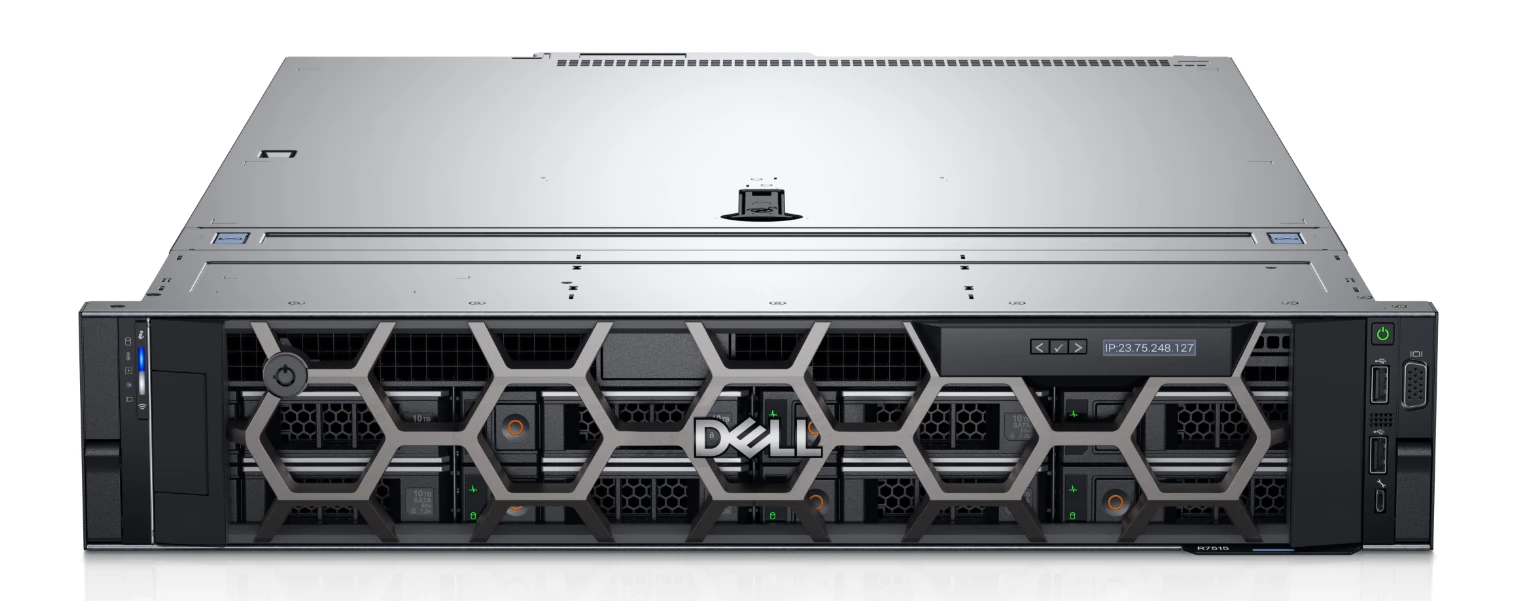
A Dell PowerEdge R7415 or R7515 looks like the best fit, but I will compare to similar offers from other vendors:
- Supermicro AS-2014S-TR: mostly similar, but it has more PCIe lanes and more drive bay with space for 12 HDDs, so it would allow for expansion of the NAS if necessary.
- HPE ProLiant DL385 Gen10 Plus: Dual socket; up to 28 drives. Overkill.
- Lenovo ThinkSystem SR665: Supports single-socket AMD EPYC CPUs with the "P" suffix. They are reportedly hard to find refurbished, single-socket even more so, so it's not my first option.
One thing that makes me reluctant to go HPE is that they don't offer free downloads of BIOS or firmware upgrades without a support contract, which is prohibitively expensive for a home user. I was already bitten by that with my current HPE Microserver Gen10, so I will probably go with Dell or Supermicro for the next one, as they have free downloads without a contract.
My final choice will depend on local availability and pricing of refurbished units, but I'm hoping to nail one of those sweet Dell PowerEdge with an AMD EPYC.
Redundancy and reliability
The Proxmox server is treated as the primary infrastructure node, it's not a toy. While my smart home is designed so that the house will keep working even if Home Assistant goes down, given that all my personal services will be running on this hardware means it is of utmost importance that it stays up and healthy.
With this in mind, these are the steps I will be taking to guarantee the availability of the application server:
- Dual PSUs: Connected to separate outlets, so a single PSU or electrical circuit failure does not bring the server down.
- UPS: Connected to at least one UPS, for emergency power backup and graceful shutdown. More details in the Power and Resilience section below.
- Boot / VM pool: 2x NVMe drives in a mirrored ZFS pool (often described loosely as "RAID1 on ZFS"). This provides redundancy for the Proxmox host, services, and configuration, so if one drive fails the system will keep on going (and the faulty drive could be hot-swapped with a new one and ZFS would rebuild the pool online).
- Dual network ports: Use at least two NICs: one for management; one for VM traffic and storage. I could also implement failover for the network links by using interface bonding, that would mean 2x for management, 2x for traffic.
- Remote management: IPMI, iDRAC, iLO, or equivalent to allow out‑of‑band management, BIOS access, and remote power control.
- Physical console for emergency access: I will have a cheap console (monitor and keyboard) around to directly connect to the server if necessary.
4. Storage
I have large storage needs, so I know from the get go that I want a NAS, with good speed, redundancy and reliability.
Why not Synology?
I initially considered a Synology NAS. Particularly the RS1221+ seemed to be exactly what I was looking for.
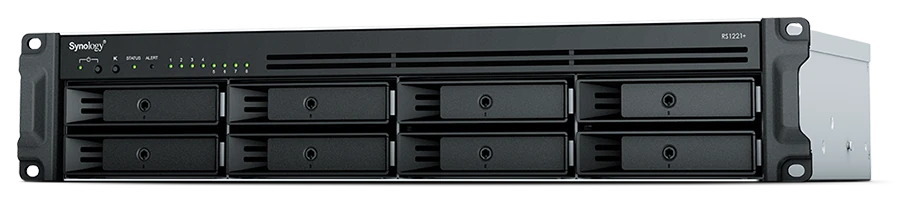
Synology products are popular for good reason: they are easy to manage and have a rich ecosystem. However, recent policy and business decisions have made them less attractive, and particularly deal breakers for me:
- Increasingly restrictive stance on third‑party drives, with models that:
- Warn, complain, or degrade the UX when non‑Synology drives are used.
- In some cases, limit support or functionality based on drive vendor.
- A growing "appliance lock‑in" direction that goes against the open, standards‑first philosophy of this homelab.
Given these concerns, I made the decision to avoid Synology and instead use open platforms and commodity hardware where I would be in full control.
Enter TrueNAS
TrueNAS is probably the best known open-source OS specialized as a NAS. It's robust, which is the number one feature you want for your storage.
It only works with ZFS, which is what I want to use for my data layer, and its UI simplifies management, monitoring and alerts. As much as I like technology and getting my hands dirty I will be busy setting everything up so I will take ease of setup and maintenance whenever I can, without losing control of course.
I considered openmediavault (OMV) because it's a direct competitor, also open-source and Linux-based. I discarded it because it is more flexible (for example ZFS is optional), it is meant for people looking to run apps in their NAS, but I don't need to because I will have a separate app server for that purpose.
So I made plans for setting up a separate server for TrueNAS, which given my storage requirements would need another beefy box (at least 64 GB of RAM to begin with, and another 10 GbE NIC). Like everything in life, it's got pros and cons:
- Pros:
- Clear separation of concerns: storage on one box, compute on another.
- Good fault isolation: if the compute node fails, storage remains up.
- Cons:
- Higher upfront cost: another server chassis, more PSUs, more NICs.
- Higher ongoing power usage.
- For a family homelab, this can be overkill.
There were two alternatives that I had read about:
- Proxmox has ZFS support, so it could double as the NAS.
- Manual ZFS configuration, one more thing to learn.
- No out-of-the-box monitoring or alerting.
- Direct hardware access, no virtualization performance loss.
- Run a TrueNAS VM inside Proxmox:
- TrueNAS runs as a VM with direct access to the HDDs via passthrough of the PCIe HBA.
- The hard drives are dedicated to TrueNAS; Proxmox does not touch them.
- ZFS is used at the TrueNAS layer for redundancy, snapshots, and replication.
- Performance hit is <5% according to some user reports.
- TrueNAS will enjoy the high-availability of the application server (dual PSUs, dual NVMe, redundant networking...)
After a pros & cons analysis I'm decided to go with the TrueNAS VM as the best compromise for maintainability, reduced hardware count, power draw, upfront cost and reliability. Having Proxmox handle the HDDs might work, but I would lose more time and lose on TrueNAS built-in monitoring and alerts.
Storage layout
At a high level:
- IPFire (fast):
- Network logs (firewall hits, IDS reports, VPN connections, etc.).
- Proxmox pool (very fast, redundant):
- Two NVMe SSDs in ZFS mirror for:
- Proxmox host.
- VMs and containers.
- Configuration, databases and metadata.
- System will continue working if one drive fails.
- Two NVMe SSDs in ZFS mirror for:
- TrueNAS pool (slow, redundant):
- Multiple HDDs in a ZFS pool.
- I'm planning initially for 8 HDDs in RAIDZ2, ideally with room for expansion up to 12.
- Fault tolerant up to 2 drives simultaneously.
- Stores:
- Immich's photo library.
- Jellyfin media.
- Music Assistant music.
- Nextcloud data.
- Paperless documents.
- Camera recordings.
- Proxmox backup.
- Snapshots and replication:
- TrueNAS will periodically snapshot datasets.
- Critical data snapshots (Nextcloud, Immich, Paperless, some Frigate recordings) will be replicated to a remote backup (off‑site).
This combination provides both local redundancy and off‑site backups, which is essential: RAID/ZFS is not a backup.
5. Cameras and Doorbell
Cameras are a key part of this homelab, but also a major security and privacy concern. I want to have cameras both outside and inside the house, but I have to make absolutely certain that nobody is snooping through them. I also want to have a video doorbell that will ring on my smartphone even if I'm away from home, but it has to work without cloud connectivity.
I will first have an installer run in-wall Ethernet cables for the cameras, so they will be connected and powered through PoE. There is a wide range of PoE cameras and doorbells available.
Initial plan: UniFi or Reolink?
At first I was debating whether to go with UniFi cameras, because they are good quality (if pricey), their software and apps are best-in-class and I am already planning on getting into their ecosystem with the switch and APs. However Ubiquiti has tried to require a cloud account for UniFi Protect in the past, so I cannot trust that their systems will continue to work in a local-only fashion, which is one of my stated goals.
Having discarded UniFi cameras, my other option was Reolink for its good quality-price ratio and perfect Home Assistant integration. The Reolink RLN16-410 has 16x PoE ports, so cameras would connect and record directly to it. That would simplify the setup and integrate with Home Assistant.
However after some research I ended up discovering that Reolink has no IPv6 support at all, and no roadmap to add it. Complete lack of IPv6 support is especially problematic in a network where IPv6 is a first‑class citizen. Over time, services and ISPs will rely more on IPv6, and running an IPv4‑only camera ecosystem creates unnecessary friction and technical debt. Without any kind of promise that IPv6 will be supported in the future I would risk having to replace all cameras (and the NVR!) at some point, so I went looking for alternatives again.
Frigate and Dahua cameras
My final solution is to stop relying on closed systems and instead have the excellent Frigate NVR software managing the cameras directly. Frigate will run as a VM in the Proxmox server.
Looking for a camera maker that respects standards and has IPv6 support I found Dahua:
- Standards support:
- ONVIF for discovery and basic control.
- RTSP for video and audio streams.
- IPv6 support.
- 2‑way audio capabilities that work with standards‑compliant tools.
- A broad ecosystem and documentation from the self‑hosting community.
There will be:
- 12 Dahua cameras, mix of indoor/outdoor.
- 1 Dahua doorbell with 2‑way audio.
All cameras and the doorbell will be connected via PoE over Cat6a cabling, ensuring good signal and also making them harder to tamper and interfere with.
Frigate will store recordings on TrueNAS (via NFS or SMB), so they automatically benefit from its hard disk redundancy, ZFS snapshots and backup routines.
Network design for cameras
All cameras will connect to a dedicated unmanaged PoE-enabled layer-2 Ethernet switch in the rack. This switch will uplink to a single port of the UniFi switch, that way it can tag all cameras in a dedicated VLAN:
- Receive addresses only on the Camera VLAN (both IPv4 and IPv6).
- IPFire firewall will disallow any Internet egress.
- Can be accessed only from:
- Frigate (for video ingest and 2-way communication).
- A very small set of admin systems (for configuration).
The main downside of this approach is that the secondary unmanaged switch can only be used for connecting the cameras, because it will be the UniFi router upstream that will handle the VLAN, but it should be cheap enough that having some unused ports won't hurt.
Object detection
Frigate NVR has built‑in object detection:
- Frigate runs as a VM (or container) on Proxmox.
- It ingests RTSP streams from the Dahua cameras and doorbell.
- It performs motion detection and object detection (people, cars, etc.).
- It manages event‑based recording, snapshots, and retention policies.
For efficient inference, Frigate uses a Coral TPU accelerator:
- A USB or PCIe Coral TPU will be plugged into the Proxmox server.
- Proxmox will passthrough the device to the Frigate VM.
- As a specialized hardware device, the TPU has low power consumption but is capable of handling multiple video streams in real time.
- It's far more efficient and cost‑effective than running GPU inference for this scale of deployment.
Video doorbell
The video doorbell can be viewed as a normal camera, but I want to be able to talk with whoever calls. Frigate can handle 2‑way audio with the Dahua doorbell, enabling local‑only, privacy‑preserving communication without any vendor cloud.
Remember that all cameras will be accessible only through the local network, but my devices will connect through the Wireguard VPN as if they are at home.
When somebody rings the bell that will trigger an event in Home Assistant, and I will be able to do any number of automations, from sending a notification to our phones, playing a chime in the house if we are present, playing a recorded message or even having an AI chat with the visitor.
6. Power and Resilience
Power planning has two separate parts:
- Reducing power consumption, both during normal day-to-day and in an emergency (e.g. a blackout).
- Securing data and graceful degradation of services in case of power loss.
On power consumption
The house will have a full solar installation:
- Plenty of solar panels that should cover the house most days of the year.
- Enough batteries to cover the house most nights of the year.
- The grid will probably be used only in cloudy winter days, it's not like I'm planning to be completely independent.
- An off-grid emergency circuit will allow the batteries and panels to provide electricity in case of a grid blackout.
With this system in place, the rack should be properly powered under most situations. However I can imagine some cases where it might come up short:
- Multiple overcast days in Winter could drain the batteries fully. I will not know the performance for sure until we move in and I start collecting stats. This means I cannot rely on just the solar batteries to power the rack.
- A prolonged grid blackout (like the 2025 one) could be problematic, especially in Winter.
As protection against these edge cases my plan is to install an UPS in the rack, and program the services for the eventuality.
Power emergency: UPS and shutdown strategy
Critical components will be connected to an UPS:
- IPFire router.
- Main UniFi switch.
- PoE camera switch.
- Proxmox server.
I have two goals:
- Keep network + cameras + core services running for as long as possible during an outage.
- Ensure the Proxmox server shuts down cleanly before the UPS battery is depleted, to keep data safe.
The shutdown flow would look like this:
- UPS communicates via USB or SNMP to a monitoring agent (either on Proxmox or a small sidecar device).
- On UPS battery activation (and the same if there is a grid blackout and the system relies on the solar batteries) trigger an energy save mode across all systems and notify me.
- On low battery threshold:
- Proxmox initiates graceful shutdown of non-critical VMs in order of priority (e.g. Jellyfin, Immich and Nextcloud first).
- On critical battery threshold:
- Proxmox shuts down all VMs to avoid data loss.
- Proxmox host shuts down.
- Networking and cameras remain up as long as the UPS can sustain them.
This protects data integrity while maintaining some level of surveillance and remote troubleshooting capability.
7. Backups and Recovery
Redundancy is not backup. There has to be an off-site copy of the critical data in case catastrophe strikes the home:
- Regular backups of Proxmox VMs (configuration + disk images) to the NAS.
- Replication of the Proxmox backups to an off-site location.
- Backup of critical datasets from the NAS to the off-site location:
- Photo collection (Immich), with metadata database.
- Nextcloud files and data (calendar, contacts...).
- Paperless documents.
- Frigate event clips (at least metadata and critical recordings, e.g. object detections or alerts).
Periodic restore tests will be part of the operational model: a backup is only as good as the last successful restore test. The plan is to test restoring at least one VM and one dataset periodically to ensure the tooling and procedures actually work.
8. Operations, Monitoring, and Security Practices
Maintainability is a key concern for my systems. I really enjoy tinkering with all this stuff, it's a hobby really, but once setup I expect it to run hassle-free for months. That is the experience with my current homelab, and what I want out of the new one.
The operational practices I'm planning to keep the system maintainable:
- Monitoring:
- Basic uptime checks for core services, for example with Uptime Kuma, with real-time notifications.
- Resource monitoring for CPU/RAM/disk/network, with threshold alerts to be aware of bottlenecks.
- SMART and ZFS scrub alerts for storage.
- IPFire intrusion alerts.
- Update strategy:
- Apply updates in a controlled fashion:
- Stable versions only.
- Take Proxmox and VM snapshots before critical upgrades.
- Update less critical services first, then core components.
- Apply updates in a controlled fashion:
- Security:
- Deny-by-default firewall.
- IoT and Cameras VLANs with no Internet egress.
- As few port‑forwarded services exposed to the Internet as possible, and those with minimal permissions and data access.
- VPN only for remote access to Home Assistant, Frigate and any other house services which are not be exposed to the Internet.
- Minimal attack surface on IPFire and Proxmox:
- Only necessary ports open.
- Admin only through trusted devices (desktop and laptop computers).
- Strong keys and passwords.
- MFA where supported.
- Up-to-date software.
9. Next Steps
This post captures the target design I arrived at after months of research. The implementation will proceed in stages, which will no doubt end up overlapping:
- Procure router/firewall server, install IPFire and start the base routing/firewall setup.
- Procure application server and install Proxmox VE.
- Procure and install rack, patch panels, and switches once the dedicated server room at the house is ready.
- Install servers and connect everything; connect all network cables; connect devices to UPS for power; start servers.
- Procure and install HDDs in the application server; set up the TrueNAS VM on Proxmox.
- Set up monitoring, logging, alerts.
- Bring up Home Assistant, integrate core smart devices, and start defining automations.
- Deploy Frigate and integrate all Dahua cameras and the doorbell.
- Deploy Nextcloud, Immich, Jellyfin, Paperless, pointing them to TrueNAS storage.
- Supporting services (monitoring, logging, alerts, etc.).
Each of these steps will generate its own set of notes, configuration snippets, and "wish I had known this earlier" insights. This is why this post is labeled as "Part 1", because I intend to fully document how this dream homelab evolves from design to reality.
Subcribe for updates!
Got any ideas, suggestions or feedback? Leave me a comment below!

