I use an OnlyKey as a hardware security device for a variety of purposes:
- Common passwords are one keypress away, they get typed automatically.
- As 2FA in my password manager (KeepassXC), by applying HMAC on the password.
- SSH connections.
- GPG encryption and signing.

SSH connections are handled through the onlykey-agent, and it works well enough. However with Ansible it becomes a nightmare as it asks for dozens upon dozens of keypresses:
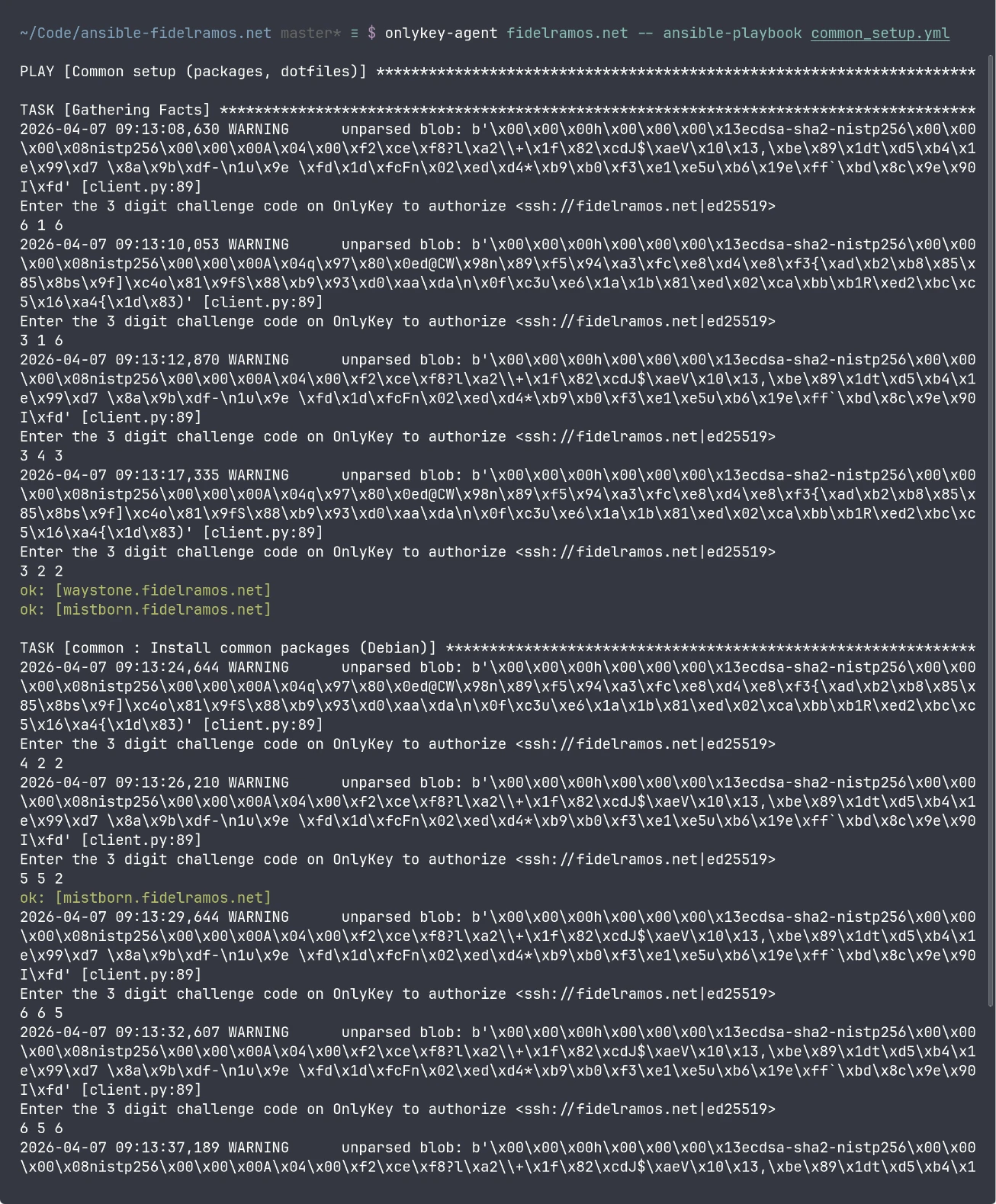
This pain was making me use Ansible less and less for my automations, so I resolved to find a fix. The goal was to have one OnlyKey press per host per script run, while keeping the behavior explicit and reasonably safe.
I'm happy to say that I managed to find a workaround, which I'm documenting here in hope that it's useful to other people. It might help not just OnlyKey users, but anybody with an SSH setup that requires manual intervention at connection time, and for some reason Ansible SSH connection reuse is not working.
The problem
Ansible often opens more than one SSH session per host during a run. Even with sane settings, you may still see repeated connections for tasks, fact gathering, privilege escalation, and other operations.
With a normal software SSH key, that's mostly invisible. You would be leaving performance on the table with all those network round-trips and extra encryption going on, but it'd work.
With onlykey-agent, each fresh SSH authentication requires physical confirmation.
That makes repeated connections very tiring very quickly.
What I observed
The high-level fix is obvious: reuse SSH connections.
And the thing is that Ansible supports reusing connections by way of OpenSSH's connection multiplexing.
In a nutshell, OpenSSH can establish a connection as master, leave a socket open, and have new connections to the same host/user/port automatically reuse it.
However when I tried to set it up with Ansible it did not work, I kept getting the same prompts on OnlyKey.
When I looked at the control path directory I saw the sockets were being created, but they disappeared briefly after.
Then I tried SSH multiplexing outside Ansible, and it worked.
I set up ControlMaster in ~/.ssh/config, and once I connected to a host with onlykey-agent I could open a new connection without another OnlyKey prompt.
However once I closed the connection the socket disappeared.
My best guess is that Ansible is closing the connections somehow, but I haven't found exactly why or how.
The solution
Given that SSH connections kept the socket open as long as they were in use, I devised a solution that would work consistently:
- Configure SSH multiplexing normally.
- Configure Ansible to use the same control path.
- Run Ansible inside a wrapper script that:
- Reads the host list from the Ansible inventory.
- Opens one SSH master per host.
- Keeps each master alive with a remote
sleep. - Runs
ansible-playbookwith all original arguments unchanged. - Kills only the SSH master processes it started when it exits.
SSH configuration
First, make sure your SSH config enables multiplexing and uses a stable control path.
Add this to ~/.ssh/config:
Host *
    ControlMaster auto
    ControlPersist 10m
    ControlPath ~/.ssh/sockets/%h-%r-%p
Then create the socket directory:
mkdir -p ~/.ssh/sockets
chmod 0700 ~/.ssh/sockets
I also like to configure users and ports in the SSH configuration, e.g.:
Host blog.fidelramos.net
    User fidel
    Port 22022
Ansible configuration
Use an ansible.cfg like this:
[defaults]
transport = ssh

[ssh_connection]
ssh_args = -o ControlMaster=auto -o ServerAliveInterval=30 -o ServerAliveCountMax=3
control_path_dir = ~/.ssh/sockets
control_path = %(directory)s/%%h-%%r-%%p
pipelining = True
-
transport = sshforces OpenSSH rather than other transports that won't use SSH multiplexing the same way. This should be the default behavior in recent Ansible versions. -
control_path_dirandcontrol_pathmake Ansible use the same socket naming pattern as SSH. -
pipelining = Truereduces some SSH overhead and remote temp-file churn. This is a good idea even without multiplexing to reduce the number of connections and speed-up Ansible execution.
The wrapper script
Here is the full script.
It intentionally does not try to manage per-host usernames or ports itself. Those are applied by the SSH config, and Ansible reuses that too.
It passes all arguments through to ansible-playbook exactly as given.
See usage examples below.
I also published the script as a Gist.
ansible-ssh-masters.sh
#!/usr/bin/env bash
# ansible-ssh-masters.sh
#
# Establish one SSH master connection per host, keep it alive with a
# remote sleep, run ansible-playbook with all original arguments, then
# clean up only the masters this script started.
#
# Useful when SSH authentication has a per-connection human cost:
# hardware security keys, passphrase prompts, FIDO2/U2F, etc.
#
# Usage (timeout in seconds):
#   ANSIBLE_SSH_MASTERS_TIMEOUT=3600 ./ansible-ssh-masters.sh playbook.yml [args...]

set -euo pipefail

TIMEOUT_SECONDS="${ANSIBLE_SSH_MASTERS_TIMEOUT:-3600}"
SOCKET_DIR="${HOME}/.ssh/sockets"

PIDS=()
STARTED_HOSTS=()
ARGS=("$@")
INVENTORY="inventory"

GREEN='\033[0;32m'
YELLOW='\033[0;33m'
RED='\033[0;31m'
NC='\033[0m'

log()  { echo -e "${GREEN}[+]${NC} $*"; }
warn() { echo -e "${YELLOW}[!]${NC} $*"; }
err()  { echo -e "${RED}[-]${NC} $*" >&2; }

parse_inventory_arg() {
    local i
    for ((i=0; i<${#ARGS[@]}; i++)); do
        case "${ARGS[$i]}" in
            -i|--inventory)
                if (( i + 1 >= ${#ARGS[@]} )); then
                    err "Missing value after ${ARGS[$i]}"
                    exit 1
                fi
                INVENTORY="${ARGS[$((i + 1))]}"
                ;;
            --inventory=*)
                INVENTORY="${ARGS[$i]#--inventory=}"
                ;;
        esac
    done
}

cleanup() {
    echo
    log "Closing master connections..."

    local i pid host

    for i in "${!PIDS[@]}"; do
        pid="${PIDS[$i]}"
        host="${STARTED_HOSTS[$i]}"

        if kill -0 "$pid" 2>/dev/null; then
            if kill "$pid" 2>/dev/null; then
                wait "$pid" 2>/dev/null || true
                log "Closed master for ${host} (pid ${pid})"
            else
                err "Failed to kill master for ${host} (pid ${pid})"
            fi
        else
            warn "Master for ${host} was already gone (pid ${pid})"
        fi
    done

    log "Done."
}

trap cleanup EXIT INT TERM

parse_inventory_arg

mkdir -p "$SOCKET_DIR"
chmod 0700 "$SOCKET_DIR"

# Remove stale sockets (no process behind them)
find "$SOCKET_DIR" -maxdepth 1 -type s ! -exec fuser -s {} \; -delete 2>/dev/null || true

if ! ansible-inventory -i "$INVENTORY" --graph >/dev/null 2>&1; then
    err "Inventory could not be parsed: $INVENTORY"
    exit 1
fi

mapfile -t HOSTS < <(
    ansible-inventory -i "$INVENTORY" --graph |
    awk '
        /@/ { next }
        {
            line = $0
            gsub(/^[[:space:]|]+/, "", line)
            sub(/^--/, "", line)
            if (line != "") {
                print line
            }
        }
    ' |
    sort -u
)

if (( ${#HOSTS[@]} == 0 )); then
    err "No hosts found in inventory: $INVENTORY"
    exit 1
fi

log "Found ${#HOSTS[@]} hosts in inventory: $INVENTORY"
log "Per-host connection lifetime: ${TIMEOUT_SECONDS} seconds"
log "Establishing master connections (authentication may be required)..."
echo

count=0
for host in "${HOSTS[@]}"; do
    ((count+=1))

    if ssh -O check -o "ControlPath=${SOCKET_DIR}/%h-%r-%p" "$host" >/dev/null 2>&1; then
        log "[$count/${#HOSTS[@]}] ${host}: reusing existing master"
        continue
    fi

    warn "[$count/${#HOSTS[@]}] ${host}: connecting..."

    ssh \
        -o ControlMaster=yes \
        -o "ControlPath=${SOCKET_DIR}/%h-%r-%p" \
        -o ServerAliveInterval=30 \
        -o ServerAliveCountMax=3 \
        -o ForwardAgent=no \
        -o ForwardX11=no \
        -o ClearAllForwardings=yes \
        "$host" "sleep ${TIMEOUT_SECONDS}" &

    pid=$!

    for _ in $(seq 1 15); do
        if ssh -O check -o "ControlPath=${SOCKET_DIR}/%h-%r-%p" "$host" >/dev/null 2>&1; then
            break
        fi
        sleep 1
    done

    if ssh -O check -o "ControlPath=${SOCKET_DIR}/%h-%r-%p" "$host" >/dev/null 2>&1; then
        log "[$count/${#HOSTS[@]}] ${host}: master established (pid ${pid})"
        PIDS+=("$pid")
        STARTED_HOSTS+=("$host")
    else
        err "[$count/${#HOSTS[@]}] ${host}: failed to establish master"
        if kill -0 "$pid" 2>/dev/null; then
            if kill "$pid" 2>/dev/null; then
                wait "$pid" 2>/dev/null || true
            else
                err "[$count/${#HOSTS[@]}] ${host}: failed to stop failed SSH process (pid ${pid})"
            fi
        fi
    fi
    echo
done

echo
log "Running: ansible-playbook $*"

set +e
ansible-playbook "$@"
ANSIBLE_EXIT=$?
set -e

exit "$ANSIBLE_EXIT"
Make it executable:
chmod +x ansible-ssh-masters.sh
Screenshot
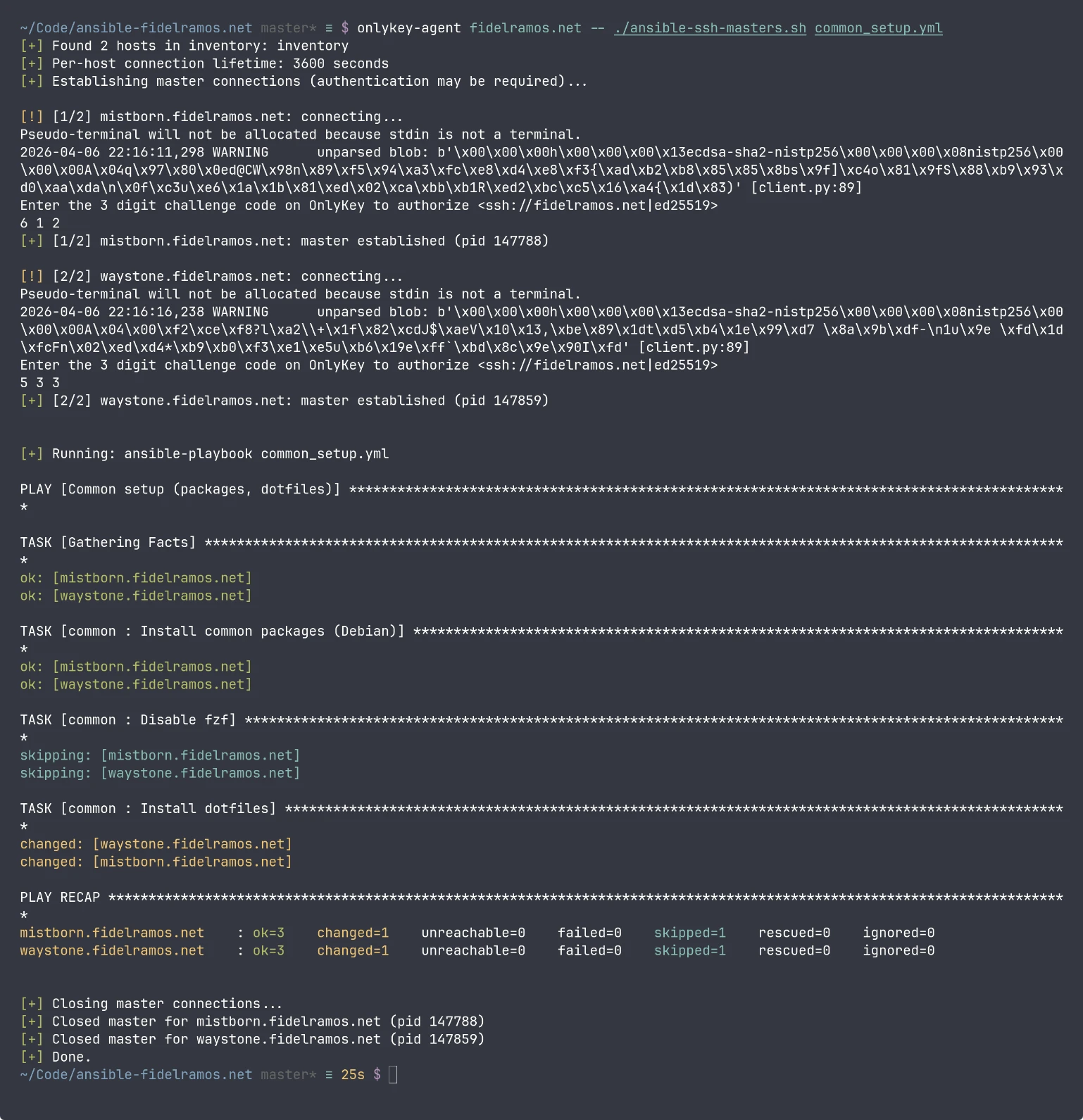
Usage
Just replace ansible-playbook with ansible-ssh-masters.sh:
./ansible-ssh-masters.sh playbook.yml
In my case I prepend onlykey-agent with the right key:
onlykey-agent fidelramos.net -- ./ansible-ssh-masters.sh playbook.yml
You can also start an onlykey-agent subshell, then run ansible-ssh-masters.sh inside:
onlykey-agent fidelramos.net -s
./ansible-ssh-masters.sh -i inventory playbook.yml
You can pass any number of arguments, or a different inventory file or expression, they get passed as-is to ansible-playbook:
./ansible-ssh-masters.sh -i production.ini playbook.yml --limit web --tags deploy -v
To change how long the pre-opened master sessions live, set the timeout in seconds:
ANSIBLE_ONLYKEY_TIMEOUT=7200 ./ansible-ssh-masters.sh long-playbook.yml
Key design points of the script
A few design choices are deliberate here.
1. Close connections on completion or exit
With the use of trap the script makes sure connections are closed as soon as they are not needed anymore, or if the script gets interrupted (Ctrl-C, killed or closed shell for example).
2. Cleans up what it started
The script kills only the SSH master processes it created.
It does not sweep the whole socket directory. That matters if you have other SSH sessions or tools using the same multiplexing directory.
3. Flexible inventory parsing
The script detects the use of -i/--inventory argument and it parses it with ansible-inventory to get the hosts where the playbook will execute.
That means any of the --inventory formats will work, it's not limited to an inventory file.
4. Uses the SSH configuration as source of truth
Instead of relying on parsing configuration it transparently uses the SSH configuration.
The script does not try to guess usernames, ports, or host aliases from Ansible.
That all stays in SSH config where it belongs.
Security notes
This setup is definitely a usability improvement, but it does diminish security while the script is running.
The main tradeoff
After you approve a host once with OnlyKey, that SSH master connection stays open for the configured lifetime or until the script exits.
That means:
- Later SSH sessions to that host can reuse the master.
- They do not need another OnlyKey press while that master is still alive.
That is the whole point of the solution, but it also means your local session becomes more important to protect during that window.
Other software in the computer with access to the SSH sockets directory could gain direct access to the remote host, which is kinda the point of using a hardware security device in the first place.
Things this setup does to limit risk
- Sockets live in
~/.ssh/sockets. - That directory is set to
0700. - Agent forwarding is disabled.
- X11 forwarding is disabled.
- The script cleans up automatically on exit.
- The timeout is explicit and finite in case automatic cleanup fails for some reason.
Also personally I use Firejail to sandbox most of the software running on my computer.
My Firejail setup blacklists access to ~/.ssh for most programs, so I feel a bit safer with this approach.
Why automatic cleanup stays enabled
The script always closes all masters after the script ends (via trap).
This is a design decision, and the script would be even simpler by just leaving the connections open until they time out. This would also mean that further Ansible invocations would not need any further OnlyKey presses.
Personally I don't want that, and I would not recommend it as the default as it further reduces security. The shorter that connections stay open the less likely they can be taken over.
Final thoughts
I feel sad that I couldn't get to the bottom of why the Ansible connection reuse was not working properly, but I couldn't allocate more time to that research.
I do feel happy to have found this workaround, which is a reasonable sweet spot between convenience and security. If this hadn't worked I was feeling close to going back to regular SSH keys, which would have reduced the security of my servers considerably.
If like me you have a cumbersome SSH connection scheme I hope this script helps you enjoy Ansible more.
If you made it this far and have an idea on how to fix it The Proper Way™, please leave a comment!
