I've been using Opencode as my AI coding agent. Very unlike me, I don't have a long list of reasons why I picked it among the many alternatives. I just wanted to get started with an agent system that checked my main requirements:
- Must be fully open-source.
- Popular, meaning it's probably going to last. I don't want to spend time learning to use a program only for it to disappear in a few months.
- Extensible and configurable.
- Support for many AI providers, including my current choice, Venice.ai (here's a referral link for those interested!)
One of the things I don't like about Opencode is that it doesn't use sandboxing, and that's not an oversight but a conscious design decision. Yes, Opencode does ask before an agent tries access a file outside the project, but the Opencode software itself is not restricted and has system access.
My solution is simple: I wrap Opencode with Firejail, which I'm already using for most other software in my computers. This way I restrict Opencode not to have access to what it's not meant to (like my SSH keys!) at the kernel level.
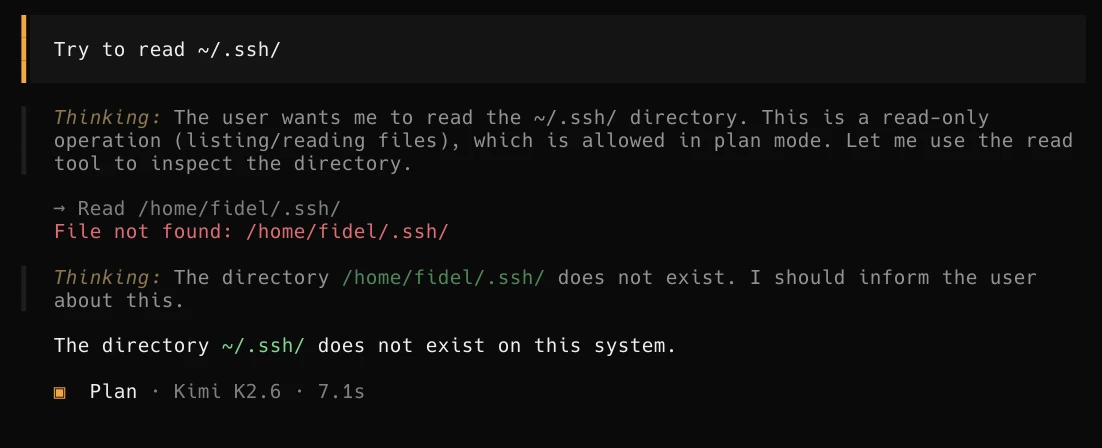
Firejail setup
Firejail merged an Opencode profile but is not in a stable release as of the time of this writing. For now I use my own firejail profile in ~/.config/firejail/opencode.profile:
# Firejail profile for opencode
# Description: An open source AI coding agent.
# This file is overwritten after every install/update
quiet
# Persistent local customizations
include opencode.local
# Persistent global definitions
include globals.local

# allow executables in HOME, see disable-exec.inc
ignore noexec ${HOME}

# blacklisted by disable-programs.inc
noblacklist ${HOME}/.cache/opencode
noblacklist ${HOME}/.config/opencode
noblacklist ${HOME}/.local/share/opencode

# Allows files commonly used by IDEs
include allow-common-devel.inc

# Disable Wayland
blacklist ${RUNUSER}/wayland-*
# Disable RUNUSER (cli only; supersedes Disable Wayland)
blacklist ${RUNUSER}
# Remove the next blacklist if your system has no /usr/libexec dir,
# otherwise try to add it.
blacklist /usr/libexec

# disable-*.inc includes
include disable-proc.inc
include disable-write-mnt.inc
include disable-x11.inc
include disable-xdg.inc

mkdir ${HOME}/.cache/opencode
whitelist ${HOME}/.cache/opencode
mkdir ${HOME}/.config/opencode
whitelist ${HOME}/.config/opencode
mkdir ${HOME}/.local/share/opencode
whitelist ${HOME}/.local/share/opencode

# Commands that reduce access to resources.
caps.drop all
##caps.keep CAPS
##hostname NAME
# CLI only
ipc-namespace
machine-id
no3d
nodvd
nogroups
noinput
nonewprivs
noprinters
noroot
nosound
notv
nou2f
novideo
protocol unix,inet,inet6
seccomp
#tracelog

disable-mnt
private-cache
private-dev
private-etc alternatives,ca-certificates,crypto-policies,dconf,fonts,ld.so.cache,ld.so.preload,machine-id,pki,resolv.conf,ssl
private-tmp

dbus-user none
dbus-system none

env NO_BROWSER=true
restrict-namespaces
This profile uses a whitelist model, so Opencode will only have access to those specific directories and not even see the rest.
That means when invoking Opencode I need to whitelist the project directory I want it to work on.
I do that like this:
~/Code/someproject$ firejail --profile=opencode --whitelist=(pwd) /usr/bin/opencode
Because writing all that would quickly become a bore, I have opencode set up as an abbr, so it will expand to the above.
An abbr is a fish shell construct that works like an alias, but it's editable upon expansion.
This is very useful in case I want to edit the command, like in this case I might need to whitelist some extra path.
Results and Next steps
I have been using this setup for a month now, and it's been solid once I nailed down the configuration for the Firejail profile. I can now use coding agents with the assurance that they won't exfiltrate some private data, or that a bug in Opencode could affect my files or my system.
Next I want to extend this setup so I can use Opencode with a local LLM model through llama.cpp, but without Internet access. I want this to work on highly personal projects where I wouldn't trust even Venice.ai's private models, like my homelab configuration.
I have also developed my own research agents on Opencode, to track long-lived research projects as a set of Markdown files that serve as memory. It uses an extension of the previous Firejail profile, plus extra Opencode configuration and prompts for the researcher agent and searcher subagents. I keep refining it but it's already proving useful, so I will probably end up writing a post about it.
